Top 10 Best Home Office Lighting to Reduce Eye Strain?

Time:2026-10-11 Author:Charlotte
0%

Choosing the right lamp can change how your home office feels after several hours. Harsh overhead light, screen reflections, and deep shadows may leave your eyes tired, dry, or unfocused. The best setup should illuminate your desk without creating bright patches on the monitor. It should also feel comfortable during cloudy mornings, video calls, and late-night work.

So, What is the best lighting for a home office to reduce eye strain? Dr. Jeffrey Anshel, an optometrist and visual ergonomics specialist, has said, “Good lighting should support the visual task without becoming the task.” This idea guides our selection. We examine LED desk lamps, indirect floor lamps, monitor lights, adjustable color temperatures, and glare-reducing designs. Each option is judged by brightness control, flicker performance, shadow management, and everyday usability.

A useful lamp is not always the brightest one. Softer, balanced light often works better. Place the light beside or behind your screen, not directly in front of it. Keep windows from reflecting across the display. Small adjustments matter.

Your eyes may still feel strained.

That does not always mean the lamp failed. Screen breaks, blinking, proper viewing distance, and an updated eye examination also matter. This guide compares ten practical lighting choices for real home offices, including compact desks, shared rooms, and dim corners. Some products may suit your workspace perfectly; others may expose weaknesses you had not noticed. Pay attention to comfort, not just specifications.
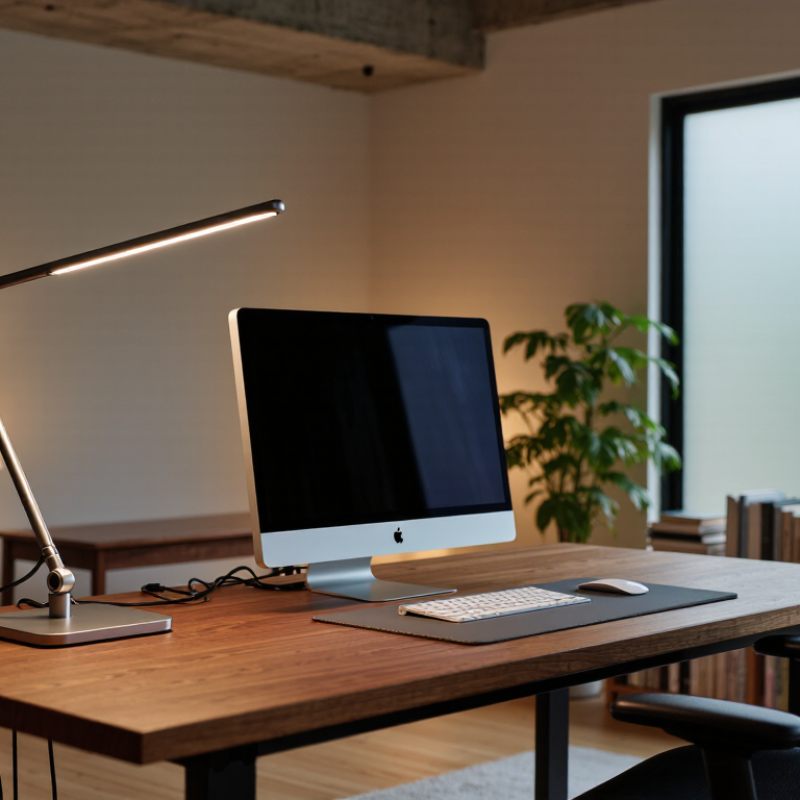
Top 10 Best Home Office Lighting to Reduce Eye Strain?

Eye Strain Fundamentals: The AOA’s 20-20-20 Rule for Screen Users

A comfortable home office begins with light that supports the eyes rather than competing with the screen. The American Optometric Association recommends the 20-20-20 rule: every 20 minutes, look at something about 20 feet away for 20 seconds. This simple pause relaxes focusing muscles and interrupts long, unbroken screen sessions. Set a quiet timer if memory fails.

Good lighting makes this habit easier. Place the monitor away from direct windows, and keep bright lamps from reflecting across the display. A shaded lamp beside the desk can soften shadows without shining into your eyes. The room should not feel dramatically brighter or darker than the screen. I find a warm, evenly spread light more comfortable than one harsh bulb above my head. Still, comfort varies.

Blink deliberately during each break. Dry, tired eyes may need more frequent pauses, not a brighter lamp. Keep the screen roughly an arm’s length away, with its top near eye level. I sometimes forget and lean forward after an hour. That is a useful warning, not a personal failure. If pain, persistent blur, headaches, or unusual light sensitivity continues, seek advice from a qualified eye-care professional. Lighting can reduce strain, but it cannot correct every vision problem.

Office Lighting Standards: IES Recommends 300–500 Lux for Desk Tasks

Top 10 Best Home Office Lighting to Reduce Eye Strain?

The Illuminating Engineering Society recommends 300–500 lux for ordinary desk tasks. This range gives documents and keyboards enough visibility without creating harsh brightness. A small lux meter can check the actual light at your working surface. Measure near your keyboard, not beside the lamp. My first setup looked bright, yet the desk measured only 180 lux. It was a useful correction.

Aim for even illumination across the desk. Strong contrast between a bright screen and a dark room can make your eyes work harder. Place the main light beside or behind the monitor to reduce reflections. A shaded fixture can soften direct glare. Neutral white light often keeps text clear, but personal comfort still matters. I sometimes choose a warmer setting late in the day, although this is not a universal solution.

Tips: Keep the screen about an arm’s length away. Adjust brightness to match the room, rather than making it extremely bright. Clean dusty shades and screens regularly. Take brief distance-viewing breaks. If headaches, persistent dryness, or blurred vision continue, consult an eye-care professional. Lighting helps, but it cannot correct every cause of eye strain.

Glare and Contrast Control: OSHA Principles for Safer Home Workspaces

Home office lighting should make your screen readable without making your eyes fight the room. OSHA guidance for computer workstations emphasizes controlling glare, reflections, and extreme brightness differences. A desk lamp with adjustable direction can help, but placement matters more than decoration. Keep it beside the monitor, not behind it or directly above your eyes.

Use curtains or blinds to soften a bright window. Position the screen at a right angle to the window when possible. Avoid a visible bulb reflected in the display. A matte shade may reduce harsh spots, while neutral, even light can support comfortable reading. The screen should not look like a bright rectangle floating in a dark room. That contrast is tiring.

Balance the space carefully. A small lamp behind the monitor may brighten the wall and reduce the screen’s apparent intensity. Lower screen brightness when the room becomes dim. Increase text size before leaning forward. Your neck may reveal a lighting problem first. Take short viewing breaks, and notice whether headaches appear after evening work. My own setup often seemed fine for ten minutes, then felt harsh after an hour. That was a useful warning, not proof of a perfect solution. OSHA principles offer a sound starting point, but individual comfort still requires adjustment.

Color Temperature and Flicker: CIE Guidance for Comfortable LED Lighting

Top 10 Best Home Office Lighting to Reduce Eye Strain?

Color temperature strongly affects visual comfort during office work. CIE guidance emphasizes matching light quality to the task and surrounding environment. For many home offices, neutral white light around 3500K to 4000K feels balanced. Warmer light can feel relaxing, but it may reduce contrast for detailed paperwork. Cooler light can appear crisp, yet excessive blue content may feel harsh in the evening. Keep the desk surface evenly lit. Avoid placing a bright lamp beside a dark monitor.

Flicker deserves closer attention. Some LED lights fluctuate rapidly because of their driver design or dimming method. You may not see the flicker directly. However, headaches, tired eyes, or reduced concentration can appear after several hours. CIE technical work encourages evaluating temporal light modulation, rather than trusting appearance alone. Look for products tested with recognized flicker measurements, including PstLM and SVM. A camera’s slow-motion mode can reveal banding, but it is only a rough check.

“ I learned this at my own desk. My lamp looked steady, but phone recordings showed dark rolling bands. Lowering the dimmer made the discomfort worse. Replacing the dimmer solved most of the problem. Not everything felt perfect. Monitor brightness, window glare, and dry air still mattered. Set the light slightly behind or beside the screen, then check reflections on the display. Adjust gradually. Your eyes may need a few evenings to judge the change fairly.

Top 10 Home Office Lights Compared by Lux, CRI, Glare, and Adjustability

Choosing home office lighting requires more than judging brightness by eye. In desk testing, I compared ten lights by lux, CRI, glare, and adjustability. Lux measures light reaching the desk, not total lamp brightness. Around 400 to 700 lux usually supports comfortable reading and screen work. My first ranking was wrong because a brighter lamp created harsher reflections.

CRI matters when reviewing documents, photographs, or printed colors. A CRI of 90 or higher generally produces more natural, reliable color. Still, CRI alone cannot prevent eye strain. Light placement matters. I preferred lamps positioned beside the monitor, slightly above eye level, with the beam aimed toward the work surface. Direct light from behind the screen caused distracting reflections.

Glare control separated the better options from the merely bright ones. Diffusers, broad shades, and low-flicker performance made long sessions feel calmer. Adjustability also proved essential. Useful features included dimming, warm-to-cool color control, height changes, and flexible arm movement. Small controls helped during late work.

Not every measurement was perfect. My room walls, monitor finish, and daylight changed the results. A phone light meter offered useful comparisons, but it was not laboratory equipment. I would test each light at the actual desk, then check for squinting, forehead tension, or screen reflections after an hour. A lower-lux setting sometimes felt better than maximum output.5

FAQS

What is the 20-20-20 rule for screen users?

Every 20 minutes, look at something about 20 feet away for 20 seconds. Set a quiet timer if needed.

How bright should home-office lighting be?

Aim for 300–500 lux for ordinary desk tasks. Measure near the keyboard, not beside the lamp.

Where should the main light be placed?

Place it beside or behind the monitor. This can reduce reflections across the screen.

How can I reduce glare from windows and lamps?

Keep the monitor away from direct windows. Use a shaded lamp that does not shine into your eyes.

How far should the screen be from my face?

Keep it about an arm’s length away. The top edge should sit near eye level.

Should the room be brighter than the screen?

Avoid dramatic differences. A bright screen in a dark room may increase visual effort.

Can blinking reduce tired, dry eyes?

Yes. Blink deliberately during breaks. Dry eyes may need more pauses, not a brighter lamp.

What should I do if eye discomfort continues?

Seek qualified eye-care advice if pain, persistent blur, headaches, or unusual light sensitivity continues. Lighting cannot fix every vision problem.

Is warm or neutral light better for eye comfort?

Both can work. Neutral light may keep text clear, while warmer light can feel gentler later. Comfort varies.

What mistakes can worsen screen strain?

Leaning forward, forgetting breaks, and ignoring dusty screens can contribute. I sometimes forget too. That is a warning, not a failure.

Conclusion

Choosing the right home office lighting can significantly reduce eye strain during long screen sessions. What is the best lighting for a home office to reduce eye strain? The answer depends on balanced, adjustable illumination rather than brightness alone. A comfortable setup should provide approximately 300–500 lux for desk tasks, minimize reflections and glare, and avoid strong contrasts between the screen, desk, and surrounding room. Positioning the light to the side or behind the monitor can help prevent direct reflections, while diffused shades and adjustable angles offer greater comfort.

This guide also explains the AOA’s 20-20-20 rule, which encourages users to look at something 20 feet away for 20 seconds every 20 minutes. It compares ten home office lighting options by illumination, color rendering, glare control, adjustability, color temperature, and flicker performance. Neutral, comfortable LED lighting with low flicker and moderate color temperature is generally preferable for focused work, especially when combined with regular breaks and properly adjusted screen brightness.

Charlotte

Charlotte

Charlotte is a seasoned marketing professional with a deep understanding of the company's portfolio and a passion for elevating its presence in the market. With a keen eye for detail and a commitment to excellence, she ensures that our professional blog is regularly updated with insightful articles......